

 38K
38K
 38K
38K
5. Features of MagicPicker panel – color wheel, color pane and modes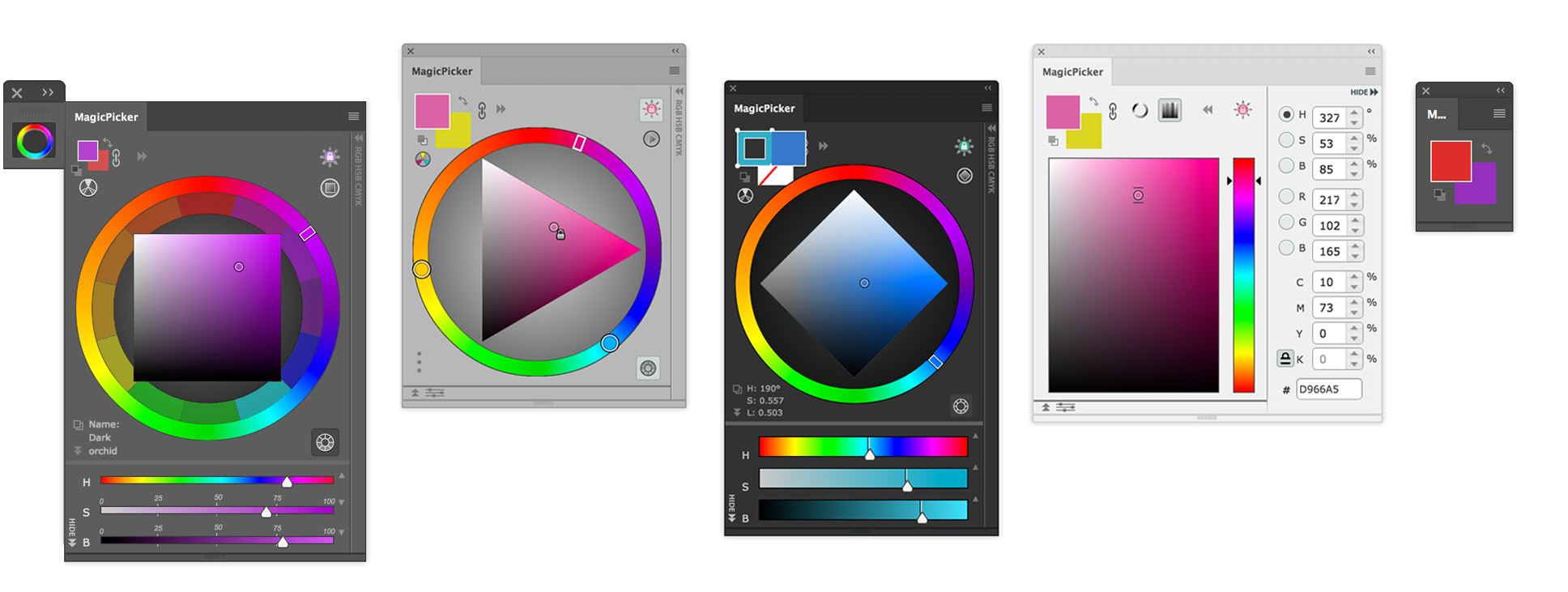 MAIN FEATURES OF MAGICPICKER COLOR WHEEL MagicPicker consists of the following work areas: Color controls (2), Color wheel (1)/Color pane (6) area, HSB/RGB/CMYK/HEX boxes (3), RGB/HSB sliders (4). You can also choose various features in the fly-out menu (5) that pops out when you press a standard button on the top right corner. The fly-out menu consists of the following options: Compact/Full mode switch, Show color wheel, Show color picker (box), Link/unlink background and foreground, Show/hide numericals, Show/hide sliders, RGB mode, HSB mode, Help, About MagicPicker version XXX, Close, Close Tab Group.  
MagicPicker main areas: color wheel, color pane, RGB/HSB sliders, HSB/RGB/CMYK/HEX boxes, fly-out menu, color controls. 1. Color Wheel and 6. Color Pane To switch between color wheel and color pane modes click the small icon representing color wheel and color pane in the Color controls area. It's the main place where you pick colors. There are two main modes for color space: Color Wheel and Color Pane. In Color Wheel mode you're choosing colors on the color wheel, while the color pane is affected by current HSB/RGB mode. Depending on the mode you can pick colors on the following panes: 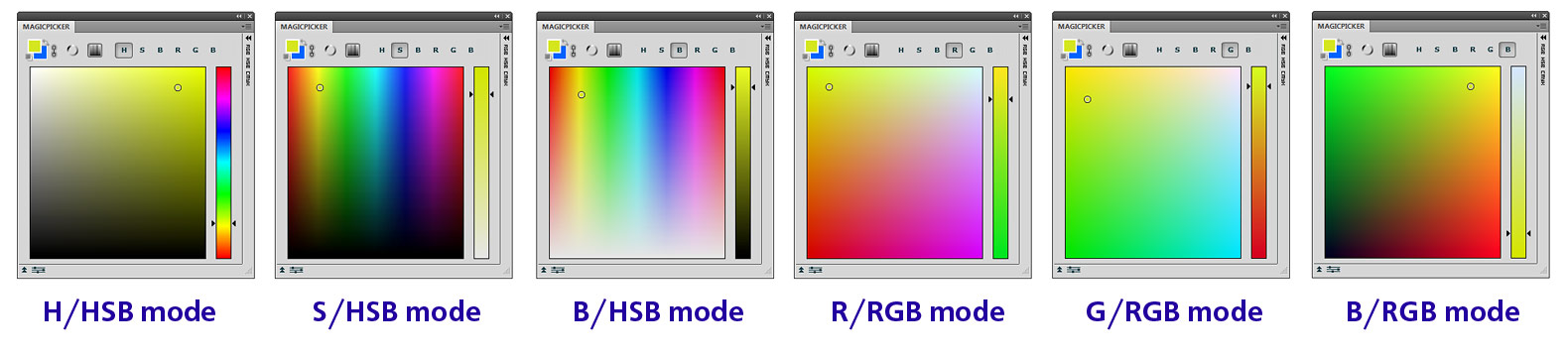 MagicPicker color pane modes for color picker 2. Color Controls In this area you can choose what color do you want to picke – background color or foreground color. To switch the color just click the corresponding box on the top left. Now, when you're changing the color with color wheel, sliders, boxes or any other way in MagicPicker you will see your new color together with the previous chosen – so you can easily see the difference and subtly tune the hue, brightness or saturation. Around the color boxes you will see two buttons: default colors and exchange colors. Thes ones act the same as they do in Photoshop – revert back to black foreground and white background and change background and foreground colors. To the right there's is a small button represented with link icon – pressing it you're linking background color to foreground color, so when you're changing one of them, the other will change in correspondence with it. The other two of the buttons let you switch between Color Wheel and Color Pane modes. 3. RGB/HSB sliders These sliders are strong scalable. When you move the divider between this area and the color wheel/color pane, the sliders become larger or smaller. They also depend on the current mode, HSB or RGB. 4. HSB/RGB/CMYK boxes These boxes let you enter directly the values of the colors in three color models. Print designers will note that CMYK boxes are color-calibrated and correctly display values based on the Photoshop color settings and color profiles. This feature is dedicated specially to graphic designers dealing with printing facilities! Web designers will also find HEX box useful for entering values directly intro HTML code. 5. Fly-out menu and Compact Mode 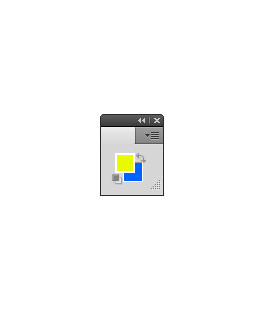 Compact mode You can switch MagicPicker into a special mode called Compact mode. In this mode the majority of the controls are hidden with only two color boxes visible on the screen. In this mode you can hide all panels in Photoshop from the screen with only a few ones visible along with MagicPicker in color mode and enjoy very fast and intuitive painting! The other menu items are: Show color wheel Show color picker (box) Link/unlink background and foreground Show/hide numericals Show/hide sliders RGB mode HSB mode Help About MagicPicker version XXX Close Close Tab Group NEXT: How to use MagicPicker color wheel and color picker in Photoshop TABLE OF CONTENTS: MagicPicker color wheel and color picker introduction : A brief history of Color Wheel : Practical Color Wheel Theory : Installing and running MagicPicker panel : Features of MagicPicker panel : How to use MagicPicker color wheel and color picker in Photoshop : Troubleshooting and frequently asked questions about MagicPicker / MagicPicker Photoshop Color Wheel |
 MagicPicker Illustrator & Photoshop color wheel manual (Illustrator & Photoshop CC, CS6, CS5, CS4, CS3).
 Download MagicPicker Illustrator & Photoshop Color Wheel/Color Picker Download MagicPicker Illustrator & Photoshop Color Wheel/Color Picker    Check other panels for Photoshop made by Anastasiy |


 Copyright©, 2007–2026 Anastasiy.
  MagicPicker, Photoshop color wheel
 MagicTints, 1-click Color Matching and correction
 MagicSquire, Brush group organizer for Photoshop
 MixColors, Photoshop color mixer
 MagicRefs, Life is easy with reference images
 DiskFonts, font manager and viewer
 Extension Manager, install, remove, manage extensions


